Python
Python A comparison of built-in and third-party configuration options for Python projects This guide compares Python’s native configuration methods and popular third-party libraries, helping developers choose the best fit for their project’s needs. #Python #DevTools #Configuration #ConfigFiles #PythonTips #OpenSource #MachineLearning #WebDev #FastAP
-
Python Configuration Management
-
Tips and tricks python scale up projects
Python Configuration Management
A comparison of built-in and third-party configuration options for Python projects
📌 Summary
This guide compares Python’s native configuration methods and popular third-party libraries, helping developers choose the best fit for their project’s needs.
⸻
🔧 Built-in Configuration Tools
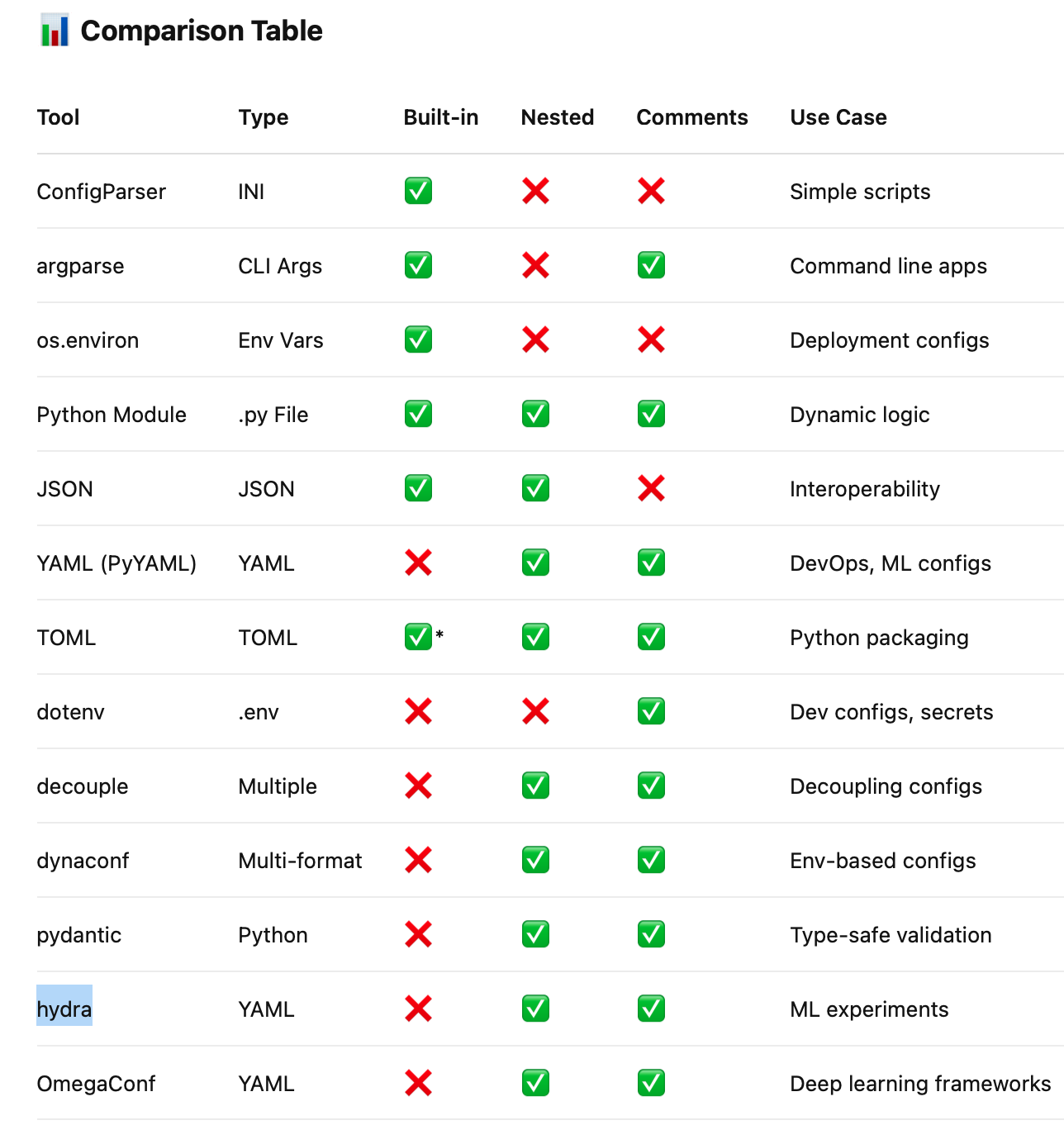
ConfigParser (INI Files) • 📄 Simple structured text files • ✅ Built-in • ❗ Limitations: String-only, no nesting
argparse (Command Line Arguments) • 🧰 Used in CLI tools • ✅ Built-in • 📝 Supports help text, types, defaults
Environment Variables (os.environ) • 🔒 Ideal for secrets and deployment • ✅ Built-in • ❗ Flat and string-only
Python Module as Config • 🐍 Python file for configuration • ✅ Built-in • 🚀 Full flexibility and dynamic logic
JSON Files • 📦 Structured data format • ✅ Built-in • ❗ No comments, strict format
TOML (e.g. pyproject.toml) • 🧪 Used in packaging • ✅ Built-in (Python 3.11+) • ✅ Easy syntax and nesting
YAML (via PyYAML) • 📚 Readable with nested structures • ❌ Not built-in (requires install) • ✅ Human-friendly and widely used
⸻
🔌 Third-Party Configuration Libraries
python-dotenv • 📁 Loads .env into os.environ • ✅ Simple and effective
python-decouple • 🔒 Separates config from code • ✅ Supports .env, .ini, etc.
dynaconf • 🔁 Supports multi-environment configs • ✅ Compatible with YAML, JSON, TOML
pydantic • 🛡️ Type-safe configs with validation • ✅ Popular in FastAPI
hydra • 🧪 Hierarchical configs for ML apps • ✅ Handles complex parameter sweeps
OmegaConf • 🌊 YAML-based hierarchical config • ✅ Designed for deep learning projects
tips
mmap -> optimization memory usage best
df =pd.series()
all=pd.dataFrame()
df['a']=x
all=pd.Concat([all, pd.DataFrame(df).T])
all.to_csv('fn.csv', index=false, na_rep="NULL')

def pow(*arge):
    x,y,z=args

def pow (x,y,z=None,/): #The forward slash (/) ensures you must call it like pow(2, 3) and not pow(x=2, y=3).


*args
**kwargs
/ positional


def timer(func):
    def wrapper(*args, ** kwargs):
        start_t=time.time()
        result=func(*args,**kwargs)
        end_t=time.time()
        print(f" function {func.__name__!r} took: {end_t - start_t: 0.4f} sec")
        return result
    return wrapper

@functools.cash
@dataclass


from collections import deque
stk=deque()
stk.append('asadfas')
stk.pop()
- o(n)
stk=[]
stk.pop().rstk[-1]

collections import lifo
deque()
appendLeft(5)
pop
more *.md
pip install pybind11
// add.cpp #include <pybind11/pybind11.h>
// Simple C++ function to add two numbers int add(int a, int b) { return a + b; }
// This creates the Python module and adds the function add
PYBIND11_MODULE(mycpp, m) {
m.def(“add”, &add, “A function which adds two numbers”);
}
cl /LD /IC:\Users-winUser.conda\envs\py314\Include /IC:\Users-winUser.conda\envs\py314\Lib\site-packages\pybind11\include add.cpp /link /OUT:mycpp.pyd /LIBPATH:C:\Users-winUser.conda\envs\py314\libs python314.lib
import mycpp print(mycpp.add(2, 3)) # Output should be: 5
2
pip install setuptools pip install cython
header
#pragma once int add(int a, int b);
cpp
#include “add.h” int add(int a, int b) { return a + b; }
add_wrapper.pyx
add_wrapper.pyx
cdef extern from “add.h”: int add(int a, int b)
def py_add(int a, int b): return add(a, b)
setup.py
setup.py
from setuptools import setup, Extension from Cython.Build import cythonize
ext = Extension( “mycython”, sources=[“add_wrapper.pyx”, “add.cpp”], language=”c++”, include_dirs=[”.”], # Path to add.h )
setup( ext_modules = cythonize([ext]) )
## python setup.py build_ext –inplace